2007-2020 Nissan X-Trail: How To Reset Maintenance Service Oil Light

2007-2020 Nissan X-Trail: How To Reset Maintenance Service Oil Light – The Nissan X-Trail is an SUV car produced by the Japanese car manufacturer Nissan Motor. This car has been on the market since 2001. The Nissan X-Trail is produced and marketed in 2001 with the version called T30.
The second version, called T31, was presented at the 2007 Geneva Motor Show. The X-Trail is equipped with NISSAN’s intelligent “all mode 4x4i” drive system and the climb back and hill assist system.

2007-2020 Nissan X-Trail: How To Reset Maintenance Service Oil Light
When the engine oil exceed the specified service interval, the maintenance reminder light will appear on the display. You should perform an oil change and reset the system. Depending on your vehicle model, here are a few ways to reset the oil light on 2007 2008 2009 2010 2011 2012 2013 2014 2015 2016 2017 2018 2019 2020 Nissan X-Trail.
2nd Generation (T31)
The first generation of Nissan X-Trail was marketed from 2007 to 2013. There are two ways to reset the oil life in this generation. Depending on your vehicle model year, here are how to reset the service light on the Nissan X-Trail:
2007-2009 Model Years
Time needed: 7 minutes
-
Turn on the ignition without starting the engine
2010-2013 Model Years
- Turn on the ignition without starting the engine
- Go to SETTINGS mode by pressing the ❏ knob repeatedly

- In the setting mode screen rotate the ❏ knob to move to MAINTENANCE menu
- Press the knob to select the menu
- Select SERVICE
- You can set an service reminder at a specific interval or select RESET on this menu
3rd Generation (T32)
The second generation is today’s latest models, this generation was introduced since 2014. Depending on your vehicle model year, here are how to reset the maintenance engine oil light on the Nissan X-Trail:
2014-2016 Model Years
- Turn on the ignition without starting the engine
- Go to the ⚙️ SETTINGS menu by using the ▲▼ navigation button
- Press the ENTER button to select the menu
- Scroll down and select MAINTENANCE
- Select SERVICE or OIL
- You can set an engine oil reminder at a specific interval or select RESET on this menu
- When a confirmation message appears, select YES to execute the oil reset
2017-2020 Model Years
- Press the ENGINE START STOP button once without depressing the brake pedal
- Go to the SETTINGS menu by using the ◄ ► navigation button
- Scroll down to the MAINTENANCE by using the ▲▼ navigation button and press OK button to enter
- Select OIL AND FILTER
- You can set an engine oil reminder at a specific interval or select RESET on this menu
- When a confirmation message appears, select YES to execute the oil reset
Repeat this guide to reset Tire and Other Maintenance if needed.
This tutorial is based on the Nissan X-Trail owner’s manual. This procedure should apply to the second and third generations of Nissan X-Trail (2007 2008 2009 2010 2011 2012 2013 2014 2015 2016 2017 2018 2019 2020 model years). Hopefully, the article 2007-2020 Nissan X-Trail: How To Reset Maintenance Service Oil Light can solve your problem. Good Luck!
Leave a Reply Cancel reply
This site uses Akismet to reduce spam. Learn how your comment data is processed.
Сброс сервисного интервала на автомобиле Nissan X-Trail
18 июля 2017 г. 
Для использования необходимы клавиша, показанная на рисунке:

Выполняем последующие шаги для сброса интервала:
1. Включите зажигание.
2. На дисплее появится символ «гаечный ключ» и напоминание о пробеге до следующего технического обслуживания.
3. В течение 5 секунд: Нажмите и удерживайте кнопку A по крайней мере 3 секунды.
4. Символ «гаечный ключ» и напоминание о пробеге до следующего технического обслуживания отображаются в мигающем режиме.
How To Reset Maintenance Service Light On Nissan X-Trail (2007-2021)
Hey yo, what’s up, everybody? I hope you got a wonderful day. Today we’re doing a short content on resetting your maintenance or service light which comes as a message on your Nissan X-Trail.
So after you change your engine oil, I guess the last thing would be to reset your vehicle’s maintenance interval. By the way, Nissan advised the oil and filter be changed every 12,000 miles through in arduous conditions; you should perform this service more frequently. So let’s start the process.
Table of Contents
How To Reset Maintenance Service Light On Nissan X-Trail
For your info, this operation work for the Nissan X-Trail T31/T32/T33 (2007, 2008, 2009, 2010, 2011, 2012, 2013, 2014, 2015, 2016, 2017, 2018, 2019, 2020, 2021, 2022 model years).
2007-2013 X-Trail (T31)
- First, turn the key in the on position
- Once the ignition is on, immediately we press and hold the ❏ button
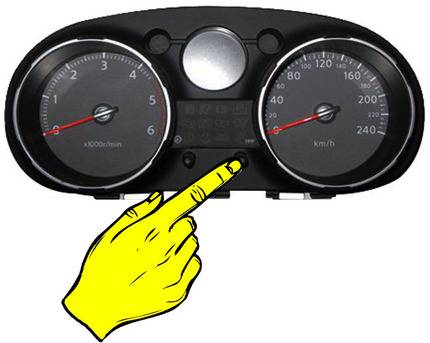
- If you do it right, you’ll see the flashing wrench and millage
- Now when I press the ❏ button briefly, it allows you to increments by 1000 kilometers each time I press it. So it’s the maintenance scheduled for a regular oil change in this vehicle
- When you get to the one that you wanted to set it to, you just go ahead and cycle the key off and now every time you turn it on we’re gonna see the new service interval
2014-2020 X-Trail (T32)
Time needed: 3 minutes
-
Turn on the ignition
The way you reset this scrolling with the ▲or▼ key on the enter button, so scroll through to the SETTINGS and hit Enter
Then scroll down to the MAINTENANCE and hit Enter
2021-2022 X-Trail (T33)
- Make sure you’ve got your key and don’t put any feet on the pedals at all, then just press the START button to turn on the ignition
- Then you want to arrow to the right all the way over to SETTINGS
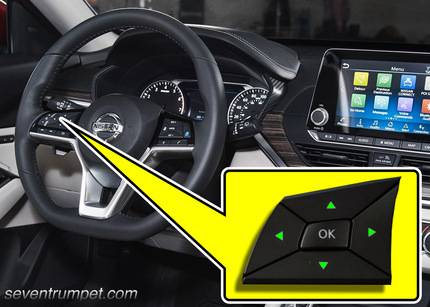
- Next, use the scroll this up and down one go down to MAINTENANCE and press OK button
- From there I’m going to the SERVICE or OIL
- Finally, hit ok on RESET and confirm it so that way the counter starts from zero
So that’s it, and you’re done. No warning message anymore, so it’s all good to go. Hopefully, that works for everybody. So thanks for tuning in guys, I appreciate it, and I’ll see you next time.
Ниссан х трейл как сбросить сервисный интервал

Модель: Nissan X Trail MK 2, T31 — Годы 2007-2014
Часть: Бортовой компьютер
эксплуатация: Как выполнить сброс сервиса на Nissan X Trail
В этом видеоуроке мы можем увидеть, как сбросить индикатор обслуживания на Nissan X Trail, следуя простым шагам: первое, что нужно сделать, это выполнить техническое обслуживание автомобиля, такое как замена моторного масла и фильтра, затем, после того, как вы сделали это самостоятельно, садитесь в машину и подтяните ручной тормоз. Включите приборную панель и оставьте двигатель выключенным, теперь нажмите педаль газа 5 раз, попробуйте выполнить эту операцию в течение 5 секунд. Теперь подождите 7 секунд, затем удерживайте педаль газа примерно 14 секунд; в этот момент индикатор сервиса должен начать мигать; теперь отпустите педаль газа и выключите автомобиль, затем включите его снова, чтобы проверить, исчез ли индикатор сервиса.
часто задаваемые вопросы
- X Trail 2007-2014 — Сигнальная лампа топливного фильтра на Nissan X Trailпрочитать ответ
Как снять обшивку передней двери Фольксваген Поло

Как снять обивку водительской двери Фольксваген Поло? В этом видео объясняется, как действовать. Прежде чем приступить к разборке, отсоединим клеммы аккумулятора в моторном отсеке. Рычагом поддеваем покрытие ручки (снимаем кусок), затем отверткой откручиваем стопорные штифты в ручке, расположенной внутри дверной панели, откручиваем штифты, размещенные в пластике дверной панели рычаг открывания двери. Рычагом снимите защелки, расположенные по периметру дверной панели автомобиля. Наконец, мы хватаем панель руками и снимаем ее с двери. Отсоединяем тросик рычага открывания дверей, клеммы питания кнопок стеклоподъемников.